> ## Documentation Index
> Fetch the complete documentation index at: https://neverminedag-sync-api-errors-9d14109.mintlify.site/llms.txt
> Use this file to discover all available pages before exploring further.
# Embed Nevermined Widgets
> Drop Nevermined checkout, card enrollment, and delegation flows into your own site as iframes signed by your organization.
If you run a Nevermined organization, you can embed Nevermined-hosted UI flows directly into your site instead of redirecting customers to nevermined.app. Your end-users stay on your domain; the iframe handles auth, payments, and card delegations against the Nevermined backend.
This guide is for organization admins. If you haven't upgraded to an organization yet, see [Platform Partners](/docs/integrations/organizations) first.
## What you can embed
Sell an agent's plans — or a standalone plan with no agent — from your own pricing page.
Let users add a payment method without leaving your site. Returns the resulting `paymentMethodId`.
List enrolled cards, create delegations, and revoke either — without redirecting to nevermined.app.
## How it works
```
Your server → createWidgetSession({ email, orgId, rawSecret, apiBaseUrl })
→ WidgetSession (2-hour JWT + bearer credential)
Browser → NeverminedWidgets.initialize({ session, environment })
→ mounts iframe(s) directly — no token-exchange call
Iframe → postMessage events: nvm:ready, nvm:success, nvm:error, nvm:close
```
The widget secret never leaves your server. The integrator backend POSTs `{ email, orgId, rawSecret }` to the Nevermined API server-to-server; the API hashes the candidate and constant-time compares against the SHA-256 of the keys you generated in the dashboard, then returns a 2-hour `WidgetSession` your backend forwards verbatim to the browser SDK.
The `rawSecret` is the equivalent of a password for your organization's widget surface. Anyone who has it can mint sessions as any end-user of your org. Keep it in environment variables on a server you control — never commit it, never bundle it into client-side JavaScript. The API only ever stores its SHA-256; if you lose the raw value, revoke the key in the dashboard and generate a new one.
## Setup
Open [Settings > Organization](https://nevermined.app/organization) in the Nevermined App and scroll to the **Widget Integration** section.
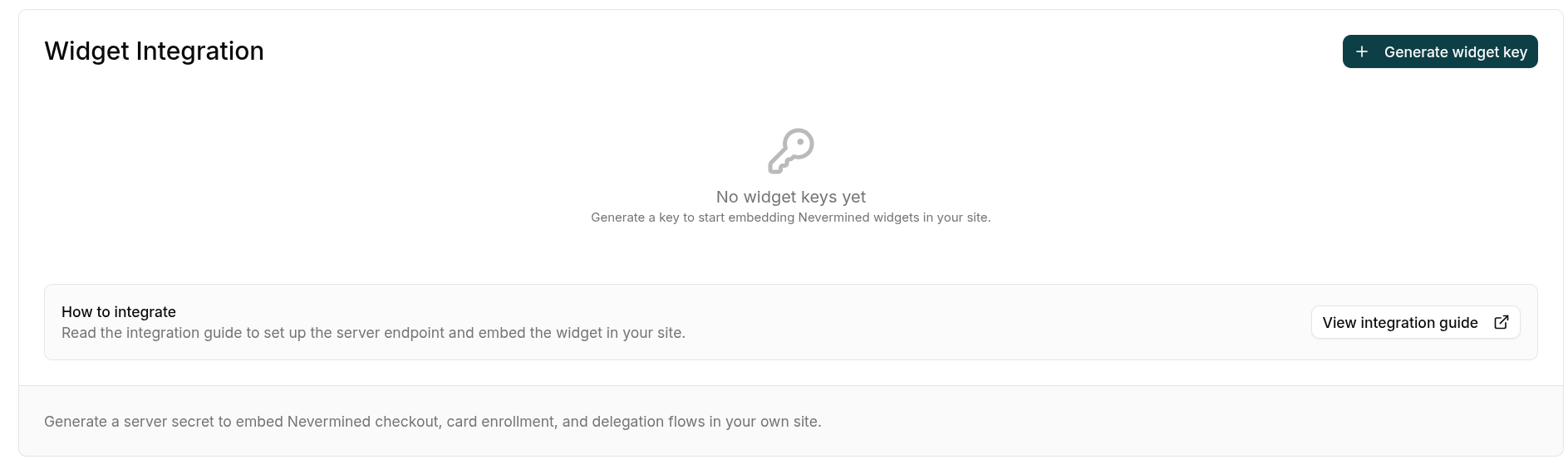 Click **Generate widget key** and fill in the dialog:
* **Name** — a descriptive label, e.g. `Production website`.
* **Allowed origins** — every domain where the widget will be mounted, e.g. `https://yourcompany.com` and `https://staging.yourcompany.com`. At least one origin is required. Use **Add origin** to add more rows. No path, query, fragment, or trailing slash.
Click **Generate widget key** and fill in the dialog:
* **Name** — a descriptive label, e.g. `Production website`.
* **Allowed origins** — every domain where the widget will be mounted, e.g. `https://yourcompany.com` and `https://staging.yourcompany.com`. At least one origin is required. Use **Add origin** to add more rows. No path, query, fragment, or trailing slash.
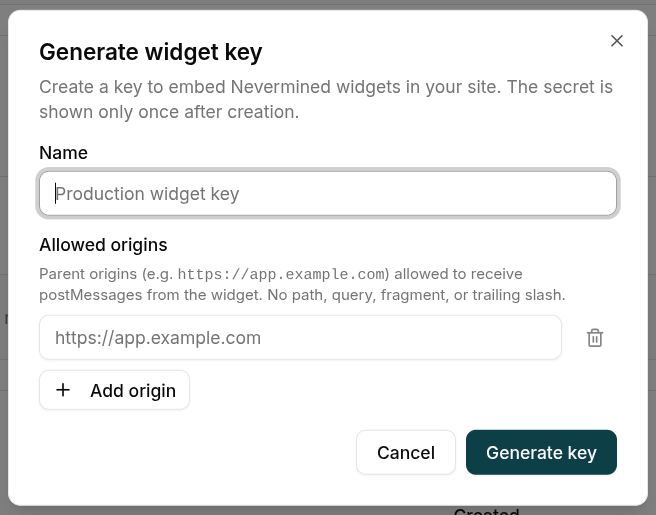 The Nevermined backend rejects widget sessions whose `parentOrigin` doesn't match this allowlist — it's your second line of defense if the secret ever leaks. You can edit the list later from the key's actions menu without rotating the secret.
Click **Generate key**. The raw secret is shown **once**. Copy it and store it as an environment variable on your server (for example, `NVM_WIDGET_SECRET`). You won't see it again.
The Nevermined backend rejects widget sessions whose `parentOrigin` doesn't match this allowlist — it's your second line of defense if the secret ever leaks. You can edit the list later from the key's actions menu without rotating the secret.
Click **Generate key**. The raw secret is shown **once**. Copy it and store it as an environment variable on your server (for example, `NVM_WIDGET_SECRET`). You won't see it again.
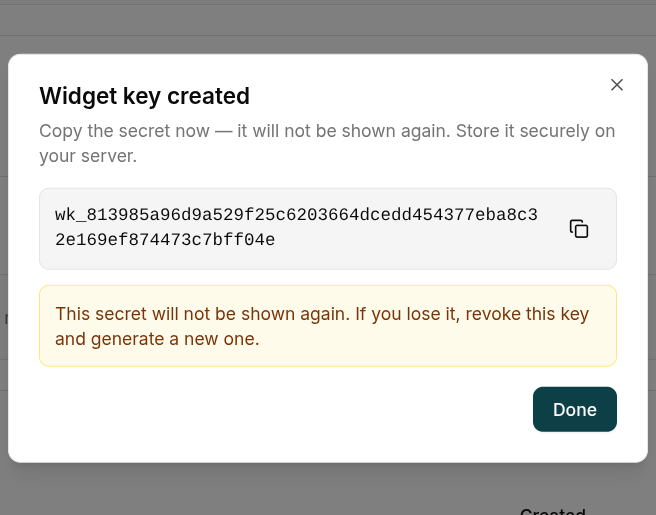 If you lose the secret, revoke the key from the dashboard and generate a new one. There's no recovery path — that's by design.
Install the server SDK on your backend and expose a small endpoint that mints a `WidgetSession` for the currently logged-in end-user.
```bash theme={null}
npm install @nevermined-io/ui-widgets-server
```
The call is the same regardless of framework:
```ts theme={null}
import { createWidgetSession } from '@nevermined-io/ui-widgets-server'
const session = await createWidgetSession({
email: '',
orgId: '',
rawSecret: process.env.NVM_WIDGET_SECRET!,
apiBaseUrl: 'https://api.sandbox.nevermined.app', // or live URL
})
```
Pick the framework that matches your stack:
```ts theme={null}
// vite.config.ts
import { defineConfig } from 'vite'
export default defineConfig({
plugins: [
{
name: 'nvm-widget-session',
configureServer(server) {
// POST-only: the response carries a bearer credential, so
// the endpoint must not be cacheable / prefetch-friendly.
server.middlewares.use('/api/widget-session', async (req, res) => {
if (req.method !== 'POST') {
res.statusCode = 405
res.setHeader('allow', 'POST')
res.end()
return
}
const { createWidgetSession } = await import('@nevermined-io/ui-widgets-server')
const session = await createWidgetSession({
email: req.headers['x-user-email'] as string, // resolve from your auth
orgId: process.env.NVM_ORG_ID!,
rawSecret: process.env.NVM_WIDGET_SECRET!,
apiBaseUrl: process.env.NVM_API_BASE_URL!,
})
res.setHeader('content-type', 'application/json')
res.setHeader('cache-control', 'no-store')
res.end(JSON.stringify({ session, environment: 'sandbox' }))
})
},
},
],
})
```
```ts theme={null}
import express from 'express'
import { createWidgetSession } from '@nevermined-io/ui-widgets-server'
const app = express()
// POST-only + `Cache-Control: no-store`: the response is a bearer
// credential and must not be cached or prefetched.
app.post('/api/widget-session', async (req, res) => {
const session = await createWidgetSession({
email: req.user!.email, // from your auth middleware
orgId: process.env.NVM_ORG_ID!,
rawSecret: process.env.NVM_WIDGET_SECRET!,
apiBaseUrl: process.env.NVM_API_BASE_URL!,
})
res.setHeader('cache-control', 'no-store')
res.json({ session, environment: 'sandbox' })
})
```
```ts theme={null}
// app/api/widget-session/route.ts — POST-only handler.
import { NextResponse } from 'next/server'
import { createWidgetSession } from '@nevermined-io/ui-widgets-server'
import { auth } from '@/lib/auth'
export async function POST() {
const authSession = await auth()
if (!authSession?.user?.email) {
return NextResponse.json({ error: 'Unauthorized' }, { status: 401 })
}
const session = await createWidgetSession({
email: authSession.user.email,
orgId: process.env.NVM_ORG_ID!,
rawSecret: process.env.NVM_WIDGET_SECRET!,
apiBaseUrl: process.env.NVM_API_BASE_URL!,
})
// Stop caches / prefetchers from snapshotting the bearer credential.
return NextResponse.json(
{ session, environment: 'sandbox' },
{ headers: { 'cache-control': 'no-store' } },
)
}
```
`email` identifies the **end-user of your site**, not the org admin. Resolve it from your auth session — Nevermined uses it as the canonical identity for the widget user (the same email logging in directly at nevermined.app resolves to the same Privy user, wallet and profile).
Install the browser SDK on your frontend.
```bash theme={null}
npm install @nevermined-io/ui-widgets
```
Fetch the `session` from your endpoint with a `POST` (the server side mints a bearer credential — `GET` would risk caching/prefetching it) and pass it straight to the SDK. The same `nvm` instance can mount any of the available widgets.
```ts theme={null}
import { NeverminedWidgets } from '@nevermined-io/ui-widgets'
const { session, environment } = await fetch('/api/widget-session', {
method: 'POST',
credentials: 'same-origin', // forward your app's auth cookies
}).then((r) => r.json())
const nvm = await NeverminedWidgets.initialize({ session, environment })
```
Then mount whichever widget you need into a container element on your page:
Each `onSuccess` receives a single `event` object: `event.result` holds the flow's result fields and `event.handle.close()` dismisses the iframe. The widget **stays mounted on success** (showing its success state) until you call `handle.close()` — there is no auto-dismiss.
Sell a specific agent's plans. Pass the agent `did`; `planId` is optional — omit it to show the plan carousel.
```ts theme={null}
nvm.checkout.start({
did: 'did:nv:',
planId: 'plan-', // omit to show the plan carousel
container: document.getElementById('checkout-widget')!,
onReady: () => console.log('Widget rendered'),
onSuccess: ({ result, handle }) => {
// result: { did: string; planId?: string; txHash?: string }
console.log('Purchase complete', result)
handle.close() // dismiss when your post-purchase UI is ready
},
onError: (err) => console.error('Checkout failed', err),
onClose: () => console.log('User closed the widget'),
})
```
Sell a plan that isn't tied to a specific agent — mirrors the public `/checkout/plan/:planId` page. No `did` required.
```ts theme={null}
nvm.checkout.startPlan({
planId: 'plan-',
container: document.getElementById('checkout-widget')!,
onSuccess: ({ result, handle }) => {
// result: { planId: string; txHash?: string }
console.log('Purchase complete', result)
handle.close()
},
onError: (err) => console.error('Checkout failed', err),
})
```
```ts theme={null}
nvm.delegations.enrollCard({
container: document.getElementById('enroll-widget')!,
provider: 'stripe', // 'stripe' | 'braintree' | 'visa' — defaults to 'stripe'
onSuccess: ({ result, handle }) => {
console.log('Card enrolled', result.paymentMethodId)
handle.close()
},
onError: (err) => console.error('Enrollment failed', err),
})
```
```ts theme={null}
nvm.delegations.listCards({
container: document.getElementById('cards-widget')!,
onCardAction: ({ action, paymentMethodId }) => {
// action: 'delegate' (user wants to delegate this card) | 'revoked' (removed inline)
if (action === 'delegate') {
nvm.delegations.createDelegation({
paymentMethodId,
container: document.getElementById('cards-widget')!,
onSuccess: ({ result, handle }) => {
console.log('Delegated', result.delegationId)
handle.close()
},
})
}
},
})
```
Every iframe-mounting method also accepts optional `width` / `height` (pixels) for inline sizing — the SDK clamps them to a supported range; omit them for the default overlay.
## Available widgets
| Method | Mounts iframe | Result |
| ----------------------------------------------------------------------- | -------------------- | ---------------------------------------------------------------------- |
| `nvm.checkout.start({ did, planId?, container, ... })` | yes | `onSuccess` → `event.result`: `{ did, planId?, txHash? }` |
| `nvm.checkout.startPlan({ planId, container, ... })` | yes | `onSuccess` → `event.result`: `{ planId, txHash? }` |
| `nvm.delegations.enrollCard({ container, provider?, ... })` | yes | `onSuccess` → `event.result`: `{ paymentMethodId }` |
| `nvm.delegations.listCards({ container, onCardAction, ... })` | yes | `onCardAction`: `{ action: 'delegate' \| 'revoked', paymentMethodId }` |
| `nvm.delegations.createDelegation({ paymentMethodId, container, ... })` | yes | `onSuccess` → `event.result`: `{ delegationId, paymentMethodId }` |
| `await nvm.delegations.revokeCard(paymentMethodId)` | no — direct API call | resolves on 2xx |
| `await nvm.delegations.revokeDelegation(delegationId)` | no — direct API call | resolves on 2xx |
All iframe-mounting methods share the same lifecycle:
| Callback | When |
| ------------------ | ------------------------------------------------------------------------------------------------------------- |
| `onBooted` | iframe DOM mounted (auth not yet validated) |
| `onReady` | session validated, widget interactive |
| `onSuccess(event)` | flow succeeded — the widget **stays mounted** in its success state; call `event.handle.close()` to dismiss it |
| `onError` | terminal error — widget destroys itself |
| `onClose` | widget dismissed (the user closed it, or you called `event.handle.close()`) — instance destroyed |
A widget instance is single-use. Once it reaches a terminal state — you call `event.handle.close()` after success, or it fires `onError` / `onClose` — calling its method again throws. Construct a fresh widget via the same `nvm` instance to mount another flow.
## Redirect / CLI mode (no iframe)
For integrations that aren't an in-page iframe — a CLI tool, or any flow where you'd rather hand the user to a full-page Nevermined screen and get them back via a callback — open the embed route as a **top-level browser navigation** instead of mounting it through the SDK.
You pass a `sessionToken` and a `returnUrl` on the query string. The page runs the same flow and, on success, redirects the browser to `returnUrl` with the result IDs (plus your `state` echo) appended as query parameters — the same shape as an OAuth callback.
These pages are served by the dedicated **embed app** (`https://embed.nevermined.app` in production, `https://embed.nevermined.dev` on staging, `http://localhost:4250` in local dev) — the same origin the SDK mounts in iframe mode. Supported on the card flows and plan-only checkout; the **agent checkout (`/checkout/$did`) is iframe-only**.
| Route (on the embed app) | Result params appended to `returnUrl` |
| ------------------------- | ------------------------------------- |
| `/cards/setup` | `paymentMethodId`, `delegationId` |
| `/cards/enroll` | `paymentMethodId` |
| `/cards/delegate` | `delegationId` |
| `/checkout/plan/` | `planId`, `paymentIntent` |
### Minting a session for redirect mode
* **CLI / logged-in Nevermined user** — `POST {apiBaseUrl}/api/v1/widgets/session/self` with the user's Nevermined credential and the `orgId` (the user must be a member of the org). Self-mint sessions only accept **localhost** `returnUrl`s — the CLI listens on a local port.
* **Hosted site** — mint with the same server-side `createWidgetSession` as the iframe flow; the `returnUrl` must belong to the widget key's `allowedOrigins`.
### Example
```text theme={null}
https://embed.nevermined.app/cards/setup
?sessionToken=
&returnUrl=http://localhost:8976/callback
&state=
```
On success the browser lands on:
```text theme={null}
http://localhost:8976/callback?paymentMethodId=pm_...&delegationId=del_...&state=
```
`returnUrl` must be an absolute `http(s)` URL and is re-validated server-side against the session's allow-list — localhost for self-mint sessions, the widget key's `allowedOrigins` otherwise. A URL that isn't allowed refuses to mount, so result IDs are never sent to an unapproved destination.
## Identity
A widget session is minted for a specific **email** (the end-user you passed to `createWidgetSession`), and that session is the **sole** identity inside the iframe. The embed app is Privy-free: it never reads the host page's Nevermined (Privy) login — which is exactly why it runs on any of your domains without that domain having to be on Nevermined's auth allow-list. There's nothing to reconcile on the host side, so no `onAuthMismatch` / host-login handling is needed; the widget always acts as the session's user.
## Environments
Pick the environment that matches the Nevermined dashboard you used to mint the widget key.
| Environment | API base | Webapp base | Embed app | When to use |
| ----------- | ------------------------------------ | ------------------------ | ------------------------------ | ------------------------------------------------ |
| `sandbox` | `https://api.sandbox.nevermined.app` | `https://nevermined.app` | `https://embed.nevermined.app` | Testing on Base Sepolia with sandbox credentials |
| `live` | `https://api.live.nevermined.app` | `https://nevermined.app` | `https://embed.nevermined.app` | Production on Base mainnet |
The SDK resolves all three for you from the `environment` you pass to `initialize` — you only need the **Embed app** origin when building a [redirect-mode](#redirect--cli-mode-no-iframe) URL by hand. A single embed deployment serves both networks of its tier; the SDK forwards the active one as a `?network=` query param when it mounts.
## Production checklist
Keep `NVM_WIDGET_SECRET` in your runtime env vars. Never commit it, never ship it to the browser, never put it in `NEXT_PUBLIC_*` or `VITE_*` variables.
Add every domain where you mount the widget. The backend rejects sessions from any other origin.
Serve both your site and your widget-session endpoint over HTTPS in production. `parentOrigin` includes the scheme, so origins must match exactly.
Pass the actual end-user email from your auth — never a placeholder, never the same value for every visitor. It's the canonical identity used across Nevermined.
If the secret might have leaked, revoke the key from the dashboard and generate a new one. Update your env var and redeploy. The API only ever stores its SHA-256, so the only recovery path is rotation.
Widget sessions expire after 2 hours; the SDK auto-refreshes them in-place. Don't cache or share session objects across users.
## Troubleshooting
| Symptom | Cause | Fix |
| --------------------------------------------------------------------------------------------- | ---------------------------------------------------------------------------------------------------------------------------------------------------------------------- | ----------------------------------------------------------------------------------------------------------------------------------- |
| `onError`: `UNAUTHORIZED`, apiCode `BCK.WIDGET_SESSION.0001` | `rawSecret` doesn't match any active key for the org — **or** the org has no active key at all (one code covers both cases, by design, so attackers can't probe which) | Confirm the secret in your env matches an active key in the dashboard; generate one if the org has none; rotate if leaked |
| `onError`: `UNAUTHORIZED`, apiCode `BCK.WIDGET_SESSION.0005` | Session token expired (default 2h) | The SDK auto-refreshes; if it fails persistently, re-fetch a fresh session from your server |
| `onError`: `UNAUTHORIZED`, apiCode `BCK.WIDGET_SESSION.0011` | The widget key was revoked while the session was alive | Re-call `createWidgetSession` with the new key's `rawSecret` |
| Widget mounts but never reaches `onReady` → `onError` apiCode `BCK.WIDGET_SESSION.0012` (403) | The mount origin isn't in the key's `allowedOrigins` | Add your site's origin to the key's allowlist (mind the scheme: `https://` vs `http://`) |
| `onError`: `UNAUTHORIZED`, apiCode `BCK.WIDGET_SESSION.0020` (403) | The `did` / `planId` you're checking out belongs to a **different organization** than the widget session | Embed only agents/plans owned by the org the session was minted for |
| `onError`: `PAYMENT_NOT_CONFIRMED` | Came back from a Stripe redirect, but the backend couldn't confirm the payment intent | Don't trust the `redirect_status` query flag alone; if the user was actually charged, reconcile via your Stripe dashboard / support |
| `onError`: `NETWORK` | Fetch failed before getting a response | Check your network, CORS, and that the `environment` matches the API you minted the key against |
| `[NeverminedWidgets] initialize: invalid environment` | `environment` is not a supported value | Use `'sandbox'` or `'live'` |
## Related
Background on Nevermined organizations and how to upgrade your account.
How Nevermined card enrollment works under the hood — the widget surfaces this same flow.
If you lose the secret, revoke the key from the dashboard and generate a new one. There's no recovery path — that's by design.
Install the server SDK on your backend and expose a small endpoint that mints a `WidgetSession` for the currently logged-in end-user.
```bash theme={null}
npm install @nevermined-io/ui-widgets-server
```
The call is the same regardless of framework:
```ts theme={null}
import { createWidgetSession } from '@nevermined-io/ui-widgets-server'
const session = await createWidgetSession({
email: '',
orgId: '',
rawSecret: process.env.NVM_WIDGET_SECRET!,
apiBaseUrl: 'https://api.sandbox.nevermined.app', // or live URL
})
```
Pick the framework that matches your stack:
```ts theme={null}
// vite.config.ts
import { defineConfig } from 'vite'
export default defineConfig({
plugins: [
{
name: 'nvm-widget-session',
configureServer(server) {
// POST-only: the response carries a bearer credential, so
// the endpoint must not be cacheable / prefetch-friendly.
server.middlewares.use('/api/widget-session', async (req, res) => {
if (req.method !== 'POST') {
res.statusCode = 405
res.setHeader('allow', 'POST')
res.end()
return
}
const { createWidgetSession } = await import('@nevermined-io/ui-widgets-server')
const session = await createWidgetSession({
email: req.headers['x-user-email'] as string, // resolve from your auth
orgId: process.env.NVM_ORG_ID!,
rawSecret: process.env.NVM_WIDGET_SECRET!,
apiBaseUrl: process.env.NVM_API_BASE_URL!,
})
res.setHeader('content-type', 'application/json')
res.setHeader('cache-control', 'no-store')
res.end(JSON.stringify({ session, environment: 'sandbox' }))
})
},
},
],
})
```
```ts theme={null}
import express from 'express'
import { createWidgetSession } from '@nevermined-io/ui-widgets-server'
const app = express()
// POST-only + `Cache-Control: no-store`: the response is a bearer
// credential and must not be cached or prefetched.
app.post('/api/widget-session', async (req, res) => {
const session = await createWidgetSession({
email: req.user!.email, // from your auth middleware
orgId: process.env.NVM_ORG_ID!,
rawSecret: process.env.NVM_WIDGET_SECRET!,
apiBaseUrl: process.env.NVM_API_BASE_URL!,
})
res.setHeader('cache-control', 'no-store')
res.json({ session, environment: 'sandbox' })
})
```
```ts theme={null}
// app/api/widget-session/route.ts — POST-only handler.
import { NextResponse } from 'next/server'
import { createWidgetSession } from '@nevermined-io/ui-widgets-server'
import { auth } from '@/lib/auth'
export async function POST() {
const authSession = await auth()
if (!authSession?.user?.email) {
return NextResponse.json({ error: 'Unauthorized' }, { status: 401 })
}
const session = await createWidgetSession({
email: authSession.user.email,
orgId: process.env.NVM_ORG_ID!,
rawSecret: process.env.NVM_WIDGET_SECRET!,
apiBaseUrl: process.env.NVM_API_BASE_URL!,
})
// Stop caches / prefetchers from snapshotting the bearer credential.
return NextResponse.json(
{ session, environment: 'sandbox' },
{ headers: { 'cache-control': 'no-store' } },
)
}
```
`email` identifies the **end-user of your site**, not the org admin. Resolve it from your auth session — Nevermined uses it as the canonical identity for the widget user (the same email logging in directly at nevermined.app resolves to the same Privy user, wallet and profile).
Install the browser SDK on your frontend.
```bash theme={null}
npm install @nevermined-io/ui-widgets
```
Fetch the `session` from your endpoint with a `POST` (the server side mints a bearer credential — `GET` would risk caching/prefetching it) and pass it straight to the SDK. The same `nvm` instance can mount any of the available widgets.
```ts theme={null}
import { NeverminedWidgets } from '@nevermined-io/ui-widgets'
const { session, environment } = await fetch('/api/widget-session', {
method: 'POST',
credentials: 'same-origin', // forward your app's auth cookies
}).then((r) => r.json())
const nvm = await NeverminedWidgets.initialize({ session, environment })
```
Then mount whichever widget you need into a container element on your page:
Each `onSuccess` receives a single `event` object: `event.result` holds the flow's result fields and `event.handle.close()` dismisses the iframe. The widget **stays mounted on success** (showing its success state) until you call `handle.close()` — there is no auto-dismiss.
Sell a specific agent's plans. Pass the agent `did`; `planId` is optional — omit it to show the plan carousel.
```ts theme={null}
nvm.checkout.start({
did: 'did:nv:',
planId: 'plan-', // omit to show the plan carousel
container: document.getElementById('checkout-widget')!,
onReady: () => console.log('Widget rendered'),
onSuccess: ({ result, handle }) => {
// result: { did: string; planId?: string; txHash?: string }
console.log('Purchase complete', result)
handle.close() // dismiss when your post-purchase UI is ready
},
onError: (err) => console.error('Checkout failed', err),
onClose: () => console.log('User closed the widget'),
})
```
Sell a plan that isn't tied to a specific agent — mirrors the public `/checkout/plan/:planId` page. No `did` required.
```ts theme={null}
nvm.checkout.startPlan({
planId: 'plan-',
container: document.getElementById('checkout-widget')!,
onSuccess: ({ result, handle }) => {
// result: { planId: string; txHash?: string }
console.log('Purchase complete', result)
handle.close()
},
onError: (err) => console.error('Checkout failed', err),
})
```
```ts theme={null}
nvm.delegations.enrollCard({
container: document.getElementById('enroll-widget')!,
provider: 'stripe', // 'stripe' | 'braintree' | 'visa' — defaults to 'stripe'
onSuccess: ({ result, handle }) => {
console.log('Card enrolled', result.paymentMethodId)
handle.close()
},
onError: (err) => console.error('Enrollment failed', err),
})
```
```ts theme={null}
nvm.delegations.listCards({
container: document.getElementById('cards-widget')!,
onCardAction: ({ action, paymentMethodId }) => {
// action: 'delegate' (user wants to delegate this card) | 'revoked' (removed inline)
if (action === 'delegate') {
nvm.delegations.createDelegation({
paymentMethodId,
container: document.getElementById('cards-widget')!,
onSuccess: ({ result, handle }) => {
console.log('Delegated', result.delegationId)
handle.close()
},
})
}
},
})
```
Every iframe-mounting method also accepts optional `width` / `height` (pixels) for inline sizing — the SDK clamps them to a supported range; omit them for the default overlay.
## Available widgets
| Method | Mounts iframe | Result |
| ----------------------------------------------------------------------- | -------------------- | ---------------------------------------------------------------------- |
| `nvm.checkout.start({ did, planId?, container, ... })` | yes | `onSuccess` → `event.result`: `{ did, planId?, txHash? }` |
| `nvm.checkout.startPlan({ planId, container, ... })` | yes | `onSuccess` → `event.result`: `{ planId, txHash? }` |
| `nvm.delegations.enrollCard({ container, provider?, ... })` | yes | `onSuccess` → `event.result`: `{ paymentMethodId }` |
| `nvm.delegations.listCards({ container, onCardAction, ... })` | yes | `onCardAction`: `{ action: 'delegate' \| 'revoked', paymentMethodId }` |
| `nvm.delegations.createDelegation({ paymentMethodId, container, ... })` | yes | `onSuccess` → `event.result`: `{ delegationId, paymentMethodId }` |
| `await nvm.delegations.revokeCard(paymentMethodId)` | no — direct API call | resolves on 2xx |
| `await nvm.delegations.revokeDelegation(delegationId)` | no — direct API call | resolves on 2xx |
All iframe-mounting methods share the same lifecycle:
| Callback | When |
| ------------------ | ------------------------------------------------------------------------------------------------------------- |
| `onBooted` | iframe DOM mounted (auth not yet validated) |
| `onReady` | session validated, widget interactive |
| `onSuccess(event)` | flow succeeded — the widget **stays mounted** in its success state; call `event.handle.close()` to dismiss it |
| `onError` | terminal error — widget destroys itself |
| `onClose` | widget dismissed (the user closed it, or you called `event.handle.close()`) — instance destroyed |
A widget instance is single-use. Once it reaches a terminal state — you call `event.handle.close()` after success, or it fires `onError` / `onClose` — calling its method again throws. Construct a fresh widget via the same `nvm` instance to mount another flow.
## Redirect / CLI mode (no iframe)
For integrations that aren't an in-page iframe — a CLI tool, or any flow where you'd rather hand the user to a full-page Nevermined screen and get them back via a callback — open the embed route as a **top-level browser navigation** instead of mounting it through the SDK.
You pass a `sessionToken` and a `returnUrl` on the query string. The page runs the same flow and, on success, redirects the browser to `returnUrl` with the result IDs (plus your `state` echo) appended as query parameters — the same shape as an OAuth callback.
These pages are served by the dedicated **embed app** (`https://embed.nevermined.app` in production, `https://embed.nevermined.dev` on staging, `http://localhost:4250` in local dev) — the same origin the SDK mounts in iframe mode. Supported on the card flows and plan-only checkout; the **agent checkout (`/checkout/$did`) is iframe-only**.
| Route (on the embed app) | Result params appended to `returnUrl` |
| ------------------------- | ------------------------------------- |
| `/cards/setup` | `paymentMethodId`, `delegationId` |
| `/cards/enroll` | `paymentMethodId` |
| `/cards/delegate` | `delegationId` |
| `/checkout/plan/` | `planId`, `paymentIntent` |
### Minting a session for redirect mode
* **CLI / logged-in Nevermined user** — `POST {apiBaseUrl}/api/v1/widgets/session/self` with the user's Nevermined credential and the `orgId` (the user must be a member of the org). Self-mint sessions only accept **localhost** `returnUrl`s — the CLI listens on a local port.
* **Hosted site** — mint with the same server-side `createWidgetSession` as the iframe flow; the `returnUrl` must belong to the widget key's `allowedOrigins`.
### Example
```text theme={null}
https://embed.nevermined.app/cards/setup
?sessionToken=
&returnUrl=http://localhost:8976/callback
&state=
```
On success the browser lands on:
```text theme={null}
http://localhost:8976/callback?paymentMethodId=pm_...&delegationId=del_...&state=
```
`returnUrl` must be an absolute `http(s)` URL and is re-validated server-side against the session's allow-list — localhost for self-mint sessions, the widget key's `allowedOrigins` otherwise. A URL that isn't allowed refuses to mount, so result IDs are never sent to an unapproved destination.
## Identity
A widget session is minted for a specific **email** (the end-user you passed to `createWidgetSession`), and that session is the **sole** identity inside the iframe. The embed app is Privy-free: it never reads the host page's Nevermined (Privy) login — which is exactly why it runs on any of your domains without that domain having to be on Nevermined's auth allow-list. There's nothing to reconcile on the host side, so no `onAuthMismatch` / host-login handling is needed; the widget always acts as the session's user.
## Environments
Pick the environment that matches the Nevermined dashboard you used to mint the widget key.
| Environment | API base | Webapp base | Embed app | When to use |
| ----------- | ------------------------------------ | ------------------------ | ------------------------------ | ------------------------------------------------ |
| `sandbox` | `https://api.sandbox.nevermined.app` | `https://nevermined.app` | `https://embed.nevermined.app` | Testing on Base Sepolia with sandbox credentials |
| `live` | `https://api.live.nevermined.app` | `https://nevermined.app` | `https://embed.nevermined.app` | Production on Base mainnet |
The SDK resolves all three for you from the `environment` you pass to `initialize` — you only need the **Embed app** origin when building a [redirect-mode](#redirect--cli-mode-no-iframe) URL by hand. A single embed deployment serves both networks of its tier; the SDK forwards the active one as a `?network=` query param when it mounts.
## Production checklist
Keep `NVM_WIDGET_SECRET` in your runtime env vars. Never commit it, never ship it to the browser, never put it in `NEXT_PUBLIC_*` or `VITE_*` variables.
Add every domain where you mount the widget. The backend rejects sessions from any other origin.
Serve both your site and your widget-session endpoint over HTTPS in production. `parentOrigin` includes the scheme, so origins must match exactly.
Pass the actual end-user email from your auth — never a placeholder, never the same value for every visitor. It's the canonical identity used across Nevermined.
If the secret might have leaked, revoke the key from the dashboard and generate a new one. Update your env var and redeploy. The API only ever stores its SHA-256, so the only recovery path is rotation.
Widget sessions expire after 2 hours; the SDK auto-refreshes them in-place. Don't cache or share session objects across users.
## Troubleshooting
| Symptom | Cause | Fix |
| --------------------------------------------------------------------------------------------- | ---------------------------------------------------------------------------------------------------------------------------------------------------------------------- | ----------------------------------------------------------------------------------------------------------------------------------- |
| `onError`: `UNAUTHORIZED`, apiCode `BCK.WIDGET_SESSION.0001` | `rawSecret` doesn't match any active key for the org — **or** the org has no active key at all (one code covers both cases, by design, so attackers can't probe which) | Confirm the secret in your env matches an active key in the dashboard; generate one if the org has none; rotate if leaked |
| `onError`: `UNAUTHORIZED`, apiCode `BCK.WIDGET_SESSION.0005` | Session token expired (default 2h) | The SDK auto-refreshes; if it fails persistently, re-fetch a fresh session from your server |
| `onError`: `UNAUTHORIZED`, apiCode `BCK.WIDGET_SESSION.0011` | The widget key was revoked while the session was alive | Re-call `createWidgetSession` with the new key's `rawSecret` |
| Widget mounts but never reaches `onReady` → `onError` apiCode `BCK.WIDGET_SESSION.0012` (403) | The mount origin isn't in the key's `allowedOrigins` | Add your site's origin to the key's allowlist (mind the scheme: `https://` vs `http://`) |
| `onError`: `UNAUTHORIZED`, apiCode `BCK.WIDGET_SESSION.0020` (403) | The `did` / `planId` you're checking out belongs to a **different organization** than the widget session | Embed only agents/plans owned by the org the session was minted for |
| `onError`: `PAYMENT_NOT_CONFIRMED` | Came back from a Stripe redirect, but the backend couldn't confirm the payment intent | Don't trust the `redirect_status` query flag alone; if the user was actually charged, reconcile via your Stripe dashboard / support |
| `onError`: `NETWORK` | Fetch failed before getting a response | Check your network, CORS, and that the `environment` matches the API you minted the key against |
| `[NeverminedWidgets] initialize: invalid environment` | `environment` is not a supported value | Use `'sandbox'` or `'live'` |
## Related
Background on Nevermined organizations and how to upgrade your account.
How Nevermined card enrollment works under the hood — the widget surfaces this same flow.